Tuesday, March 29, 2016

Blog Post #9

Ever since hearing about what a flipped classroom is and how it works I have always been interested. After reading about it in Chapter 10, I would describe the flipped classroom to be a creative way to mix up the way students learn. The Flipped Classroom gives the teacher more time in class to show example problems and/or have the students work in groups while also giving the students a way to go back and re-watch lectures from previous days. In a flipped classroom there is a lot of technology that is required because the teacher has to be able to set it up and the students have to be able to view all of the online material. I like the idea of a flipped classroom but I can also see how it can be challenging because it is up to the students to take part in participating with all of the work. I think that a flipped classroom can definitely work well! http://flippedlearning.org/domain/36 

An interesting web-based resource that I might use for professional development is WatchKnowLearn. WatchKnowLearn has multiple videos and descriptions of lesson plans that other teachers have made for students and whoever needs. I know that when I become a teacher I am going to need guides/videos to help me set up my lesson plans and get the school year going. This can benefit my students and me in a positive way. http://www.watchknowlearn.org/

I acquired many skills from the PowerPoint Interaction assignment. I now know how to add sound to my PowerPoints and use shapes for navigation buttons. I am also now familiar with Hyperlink. I like how many things you are able to do with PowerPoint and I feel like everyday there is something else to learn about it. I find it fascinating with all it has to offer. I dislike some features that I don't think are necessary and hard to work with. Everything that I did for this assignment can help me with my future teaching career and I can't wait to explore more!


Tuesday, March 22, 2016

Blog Post #8

The technology advancement in chapter 12 that I believe holds the biggest promise for education are the Personal Learning Environments. I found this technology to be very easy to use and simple. A Personal Learning Environment is kind of like a virtual classroom and I think that this could benefit children that aren't able to be a part of a regular classroom setting or even just as an extra source to use. A benefit of the PLE is that it is specifically for the student and designed for the student. Through this source a student can make goals and achieve them.

I would define the digital divide as the technological separation between people of different financial access. For the digital divide there is one group who can't afford accessing the internet or any other kinds of technology, and then you have the second group that come from higher socioeconomic standings and will probably have a higher chance in a greater access to technology. For me personally, I think that I have been given a greater amount of access to technology than a lot of other kids my age. I think that other kids my age have been given a great amount like me, and others haven't been given that much. In my future classroom I think that this will still be an issue as long as there is a financial divide between students. When I am a teacher, I need to remember that not all students have been given access to a lot of technology as other students may have. Also, I need to keep that in mind when giving out work to the students. I need to make sure that it doesn't involve advanced technology that not all the students may have access to.

When doing the PowerPoint assignment I was mostly frustrated. I knew how to do everything that was asked except for when it came to recording the audio I started getting confused. It was a lot of work and I didn't realize how much time it would take to do all of it. After I finished though I felt accomplished and found the voice recording to be interesting. I plan to use PowerPoint in my future career but maybe not with the voiceover. I think that posting PowerPoints to a class website after they are presented, can be incredibly helpful to the students.

Tuesday, March 15, 2016

Blog Post #7

I might use PowerPoint to support student learning at each level of Bloom's Taxonomy. Bloom's Taxonomy is based on six different domains of learning. The six domains are creating, evaluating, analyzing, applying, understanding, and remembering. With using Bloom's Taxonomy, I would probably incorporate it in a Powerpoint. The basic purpose of the PowerPoint would be to help the students remember information that they had just read. On each slide I will have important dates, pictures, and events to help them remember all of the information thoroughly. I will provide each level and explain what each level means. I think that Bloom's Taxonomy would really help the students learn in a positive way. 

In the podcast and the book, they said that adaptive technologies could be useful to help students with different disabilities such as: visual/hearing impairment and dyslexia. Some examples include a student who is visually impaired or even blind they can use a computer screen that is magnified or the text2speech website that can read anything that they're typing back to them. A child that has trouble spelling/writing can use a voice recognition software that can help them with their note taking, and a child who has trouble with their motor skills can use something else other than a mouse as a controller. I don't have any learning disabilities so I have never had to use any of these helping devices nor have I seen anyone else using them either. Even though I haven't personally come in contact with any of this, I know that it exists and can be incredibly helpful but also distracting towards the other students. As a teacher, it is our duty to help students with disabilities and provide what we can for them the best we can, so that the other students aren't distracted. 

A few things that I learned from the web page design assignment was being able to set up a website for me to use in the classroom as a teacher. A class website is a great resource to use in the classroom and I am thankful to now know how to use it and create one. I can improve my website next time by putting more time into it and really working on it more diligently. 

link to website: http://www.weebly.com/weebly/main.php

ILP Participation- FSU Tech Sandbox

During class a few weeks ago we took a tour to see the FSU Tech Sandbox which was located in the education building. I didn't realize how much technology was available so close to where I take my education classes. I found all of the technology to be super interesting and didn't know that all of it even existed. I thought it was cool to be able to use different forms of technology such as Smartboards, 3D printers, audio games for the children, and Google glasses. I hope in my future teaching career that this will all be provided for me to use in the classroom. 

The one thing that I thought was really cool was the Smartboard. I am very familiar with Smartboards but after the Sandbox Tour I learned a lot more than I already knew. I really like how hands on it allows students to be, and I also like how interactive it allows the students to be. I like how you can use a Smartboard to paste 3D images, and how you're able to use your finger while working with it, but also a pen. I think that 3D pictures can be really helpful for specific classes. 
I also found the Google Glasses to be awesome as well. It really shocks me with what our world is coming to and instead of writing and taking down notes, you can record them with these glasses. These glasses could be incredibly useful for students with disabilities especially who aren't able to copy down notes as fast or write properly. 

One of the technologies that I don't see being as useful for my future teaching career would probably be the Google glasses. Even though I found them to be really cool, I think that there still needs to be a lot of work done with the device to make it better. The guy giving us the tour and showing us all the different kinds of devices told us that they weren't really that liable and that they run out of charge easily. I also remember playing with the glasses and not really knowing how to get them working. 

Overall, I didn't know what to expect before the Sandbox Tour. I didn't know that all of these different technologies existed and I am still in awe with how our world is advancing day by day. I really enjoyed the tour, and I can't wait to see what other forms of technology are to come!
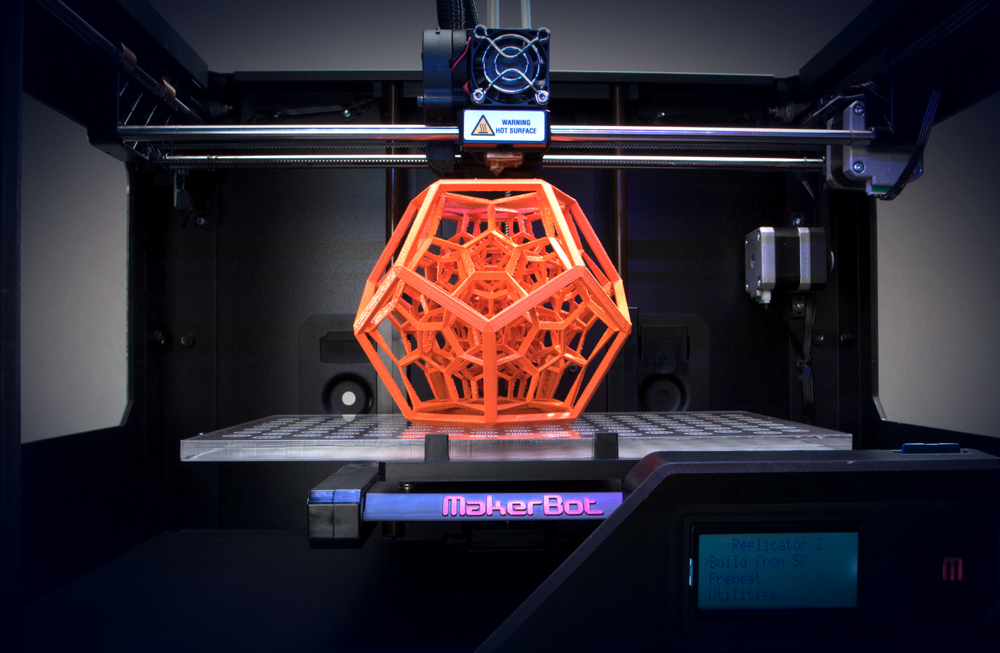
Here is a picture of a 3D printer, like the one they showed us on the tour.